Self-Hosted Homelab Logging,
Without the Enterprise Bloat
Most logging stacks require several gigabytes of RAM just to collect logs from a router, a couple of VMs, and a handful of containers. LogShed ingests Syslog traffic and Docker output into a fast local SQLite FTS5 database with real-time streaming, rate-spike alerts, and secret-redacted AI diagnostics.
docker pull ghcr.io/logshed/logshed:latest
Built for Dense, Real-Time Operations
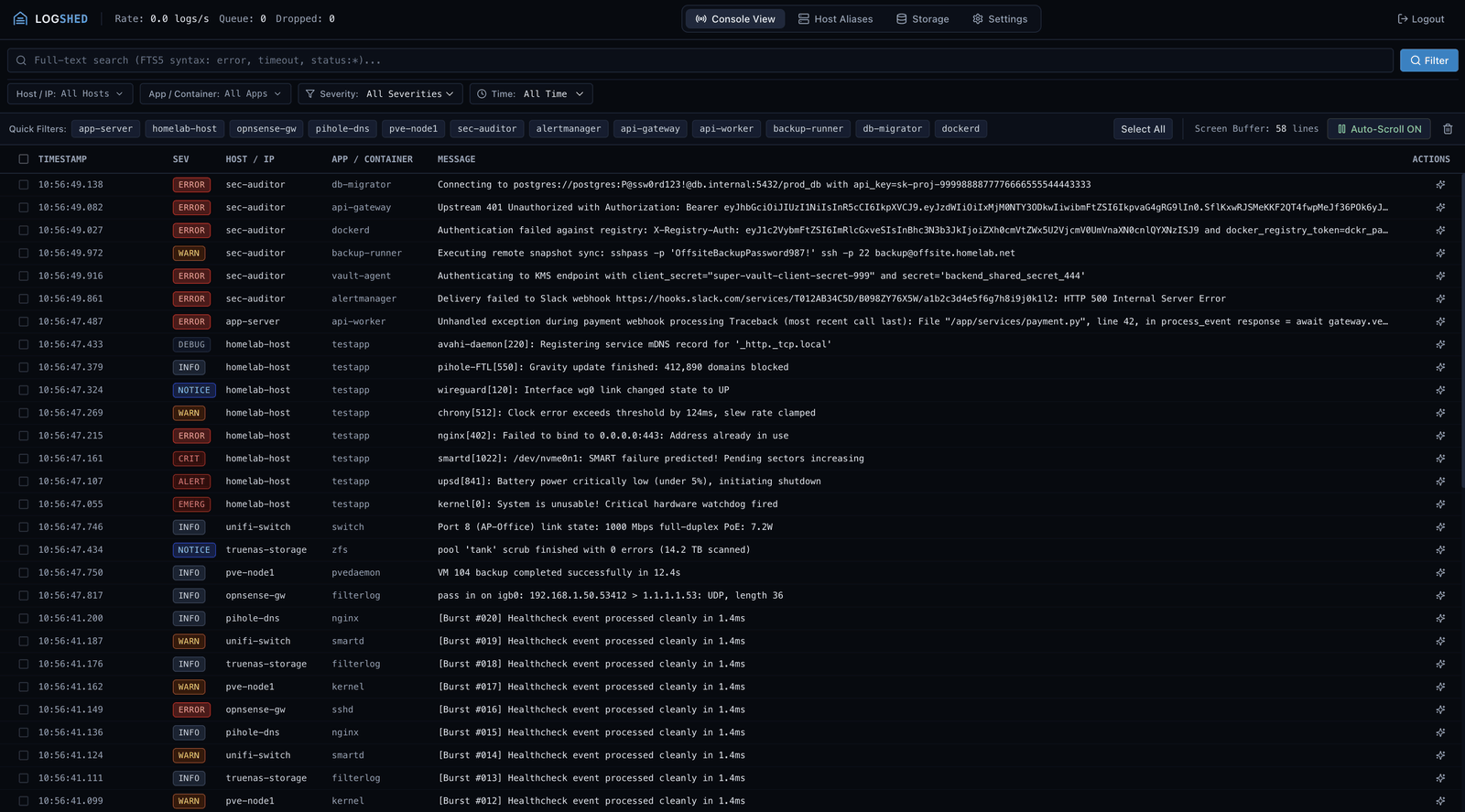
Stream live container and network logs, filter by host or severity in milliseconds, and inspect surrounding context in a single dark-mode console.
Everything a Homelab Needs
Purpose-built for home servers, routers, NAS appliances, and Docker hosts without external databases or complex agents.
Live Streaming & FTS5 Search
Stream incoming logs via SSE without lag, jump back through history with sub-second SQLite FTS5 search, and step chronologically through surrounding lines.
Noise Control at the Door
Discard repetitive cron chatter, health checks, and debug spam in memory using ingestion drop rules before anything touches your SSD.
Rate Spike & Pattern Alerts
Catch critical error bursts or runaway container restart loops. Deliver alerts straight to Discord, Telegram, Pushover, Gotify, Slack, or webhooks via Apprise.
Secret-Redacted AI Diagnosis
Decipher cryptic stack traces with Gemini, OpenAI, or local Ollama. Passwords, API keys, and tokens are automatically masked before leaving your server.
Maintenance Windows
Silence notification channels or drop noisy error chatter during planned package updates, homelab restarts, or scheduled system backups.
Daily Digest & Homelab Aliases
Receive automated 24-hour analytical rollups on your notification channels, and map router or switch IP addresses to friendly host aliases.
Targeted Prune & Compaction
Delete specific noisy log ranges on demand and compact the local SQLite database immediately to reclaim SSD space.
Programmatic External API
Generate scoped Bearer tokens for external automation, Home Assistant integrations, Proxmox backup scripts, and AI agents with fine-grained permissions.
Built-In MCP Server
Connect Claude Desktop, Cursor, or Windsurf directly to your homelab via Model Context Protocol to search logs, inspect context, and manage maintenance mode.
Up and Running in 60 Seconds
Deploy as a single container with no external database dependencies. Point `/data` to a local SSD path and open port `8080`.
services:
  logshed:
    image: ghcr.io/logshed/logshed:latest
    container_name: logshed
    restart: unless-stopped
    ports:
      - "8080:8080"        # Web Dashboard
      - "1514:1514/udp"    # Syslog UDP Ingestion
      - "1514:1514/tcp"    # Syslog TCP Ingestion
    environment:
      - PUID=1000
      - PGID=1000
      - TZ=UTC
      - PORT=8080
      - SYSLOG_PORT=1514
      - DOCKER_HOST=unix:///var/run/docker.sock
    volumes:
      - ./data:/data
- /var/run/docker.sock:/var/run/docker.sock:roExplore the Repository
Step-by-step setup guides and technical specifications are maintained directly in the GitHub repository.
Forwarding Logs Guide
Syslog configuration for OPNsense, Proxmox VE, Synology DSM, UniFi, pfSense, Linux, and Docker.
Configuration Reference
Complete environment variable catalog, runtime settings hierarchy, and local SSD storage paths.
Alert & Drop Rules Guide
Real-time threshold, regex pattern, and velocity spike alerts, plus in-memory ingestion drop rules.
Technical Specification
System architecture, single-process async workers, SQLite WAL + FTS5 triggers, and security model.
Model Context Protocol (MCP) Guide Coming Soon
Connect Claude Desktop, Cursor, and AI coding assistants to query and diagnose homelab incidents.
Programmatic External API Coming Soon
Scoped Bearer API endpoints for Home Assistant, backup scripts, and external automation.